TECHNOLOGY PROVIDER VERIFICATION DOCUMENT USING FACEBOOK GRAPH API
1. Development Information
- Company / Individual Name: Địa Ốc 084
- Official Website (if any): https://diaoc084.com
- Contact Email: [email protected]
- Address: 306/1 Phạm Văn Bạch Street, Ward 15, Tân Bình District, Ho Chi Minh City, Vietnam
2. Application Information
- Application Name: LanhDeveloper
- App ID: 332838942003567
- Language / Technology Used: C#, .NET Framework
- APIs Used: Facebook Graph API
3. Purpose of the Application
The application is developed to automate the process of posting content to Facebook groups where the user is a member or administrator, as well as to fan pages managed by the user. It aims to help users save time and increase work efficiency.
The application is not intended for spam, does not share user data with any third parties, and fully complies with Facebook Platform Policies.
4. Application Features
- Automatically post content to Facebook groups that the user is a member of (after obtaining proper permissions).
- Automatically post, comment, delete, and edit posts on pages managed by the user.
- Post content with images, links, or plain text.
- Manage posted content (edit, delete, track post status).
- Support for multiple user accounts with individual access tokens.
- Schedule posts in advance.
- Maintain an activity log so users can monitor all actions.
🗂️ To test the application:
- Download the file
Smarttool.7zfrom the below link:
https://drive.google.com/file/d/18KwDQFlVxoCMfySm8igtY6NH7bB9Qvw6/view?usp=drive_link - Extract the contents to the folder:
D:\Smarttool
🔐 Facebook account for testing purposes:
- Username: “xxxxx” (please send my email [email protected])
- Password: “ppppp” (please send my email [email protected])
- After logging in, retrieve the User Access Token from:
https://developers.facebook.com/tools/explorer/
4.1 Available Features:
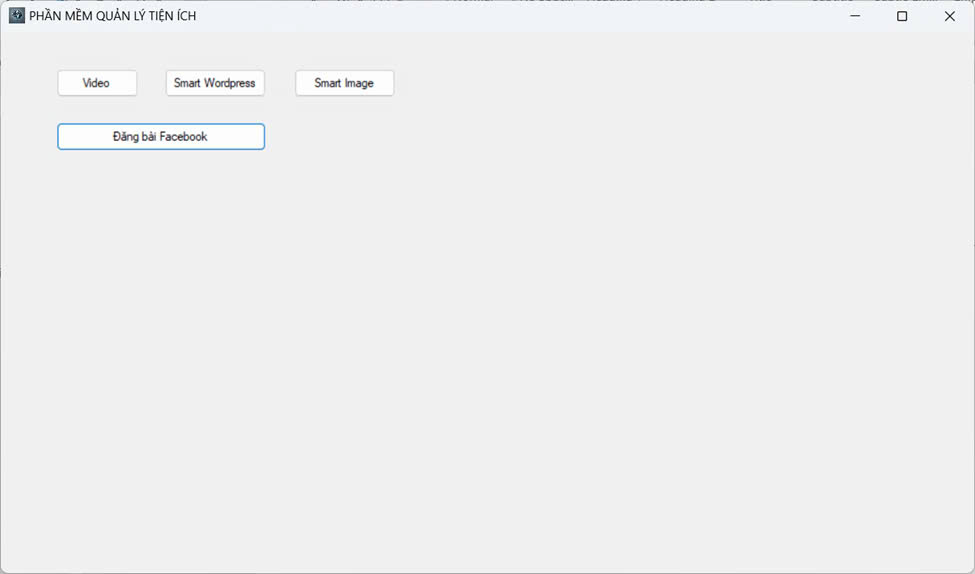
1. Lunching the application:
When launching the application, the main interface will appear as shown below.
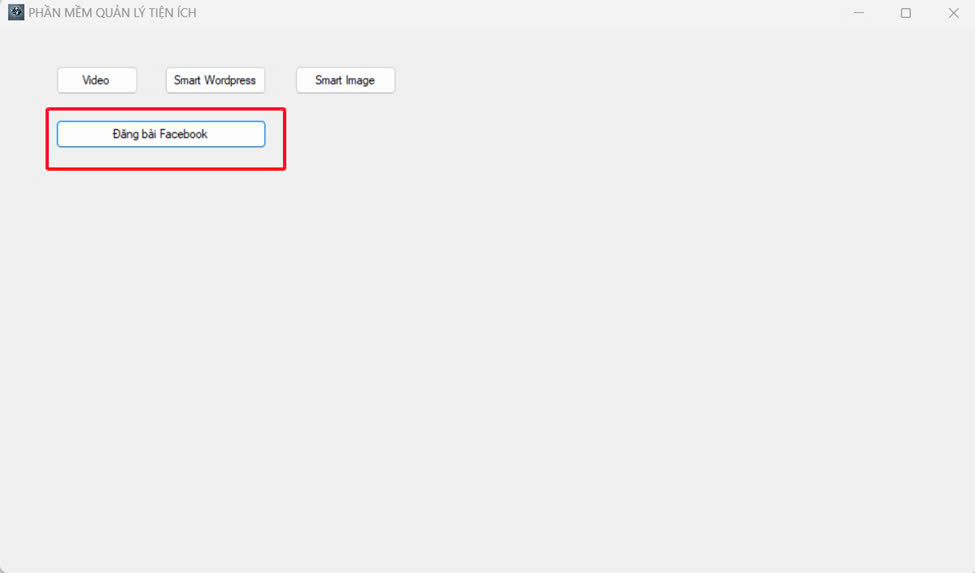
2. Using the Feature:
Click on the “Đăng bài Facebook” button.
The following interface will appear.
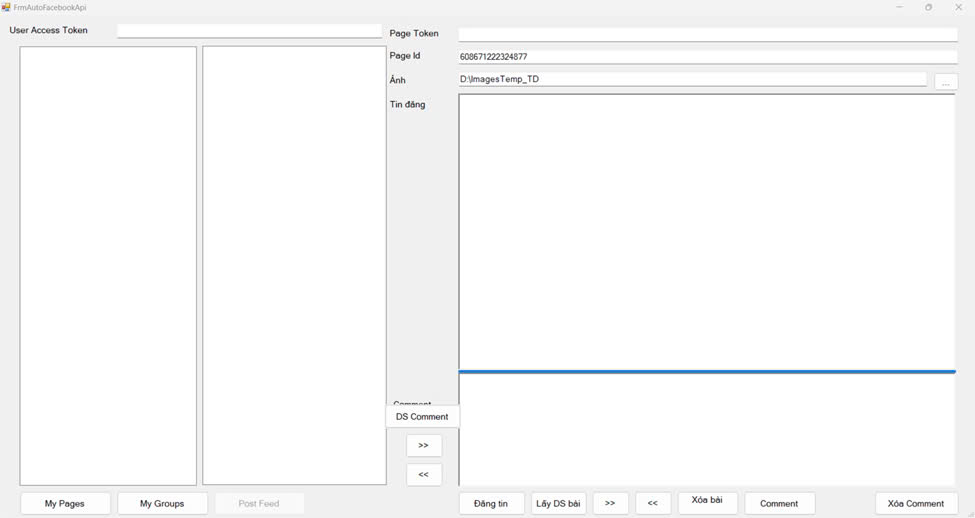
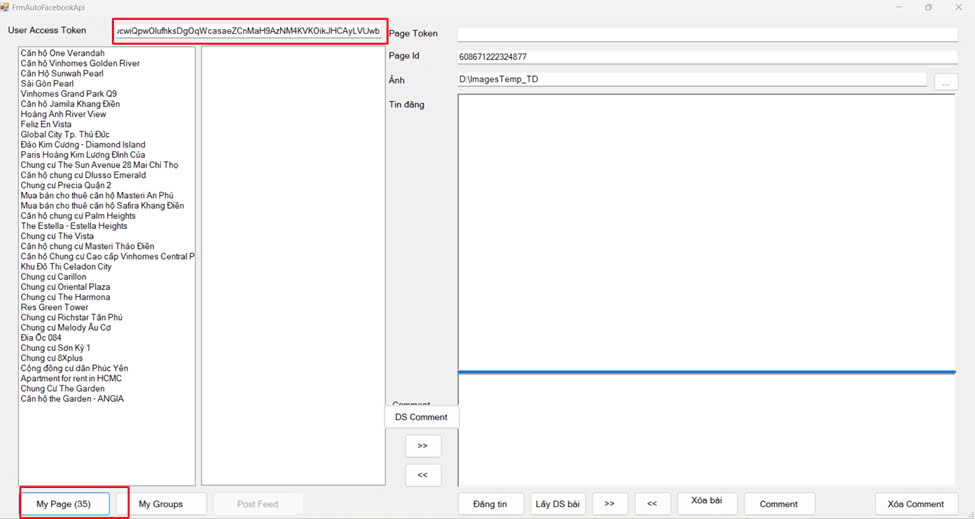
Enter your User Access Token, then click “My Pages” to retrieve the list of pages you manage.
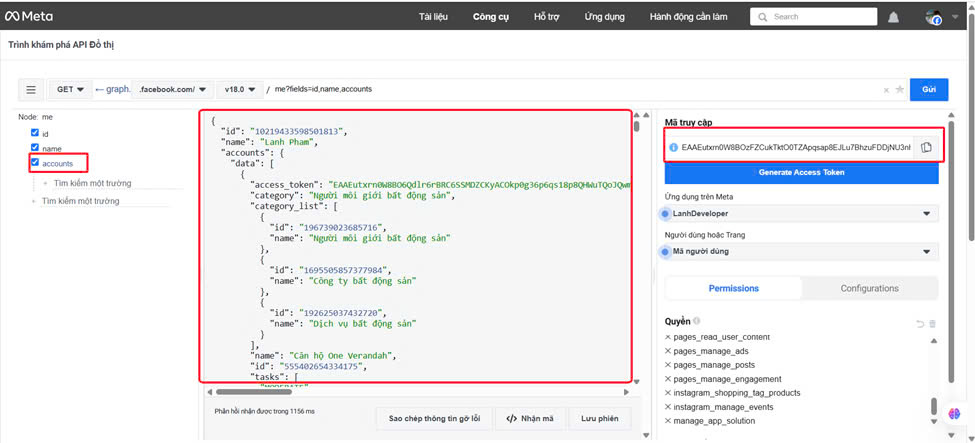
You can obtain the User Access Token from the Facebook Graph API Explorer interface shown below.
3. Feature Descriptions:
3.1 Display List:
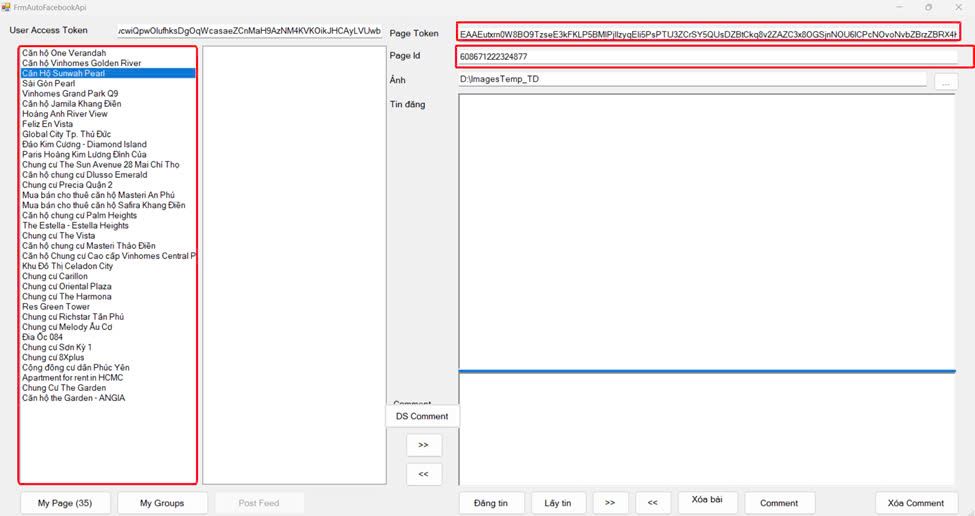
When the user selects (clicks) a page from the list, the Page ID and Page Access Token will be displayed in the two corresponding red-colored boxes on the right, as shown in the image below.
3.2 “Đăng tin” Button
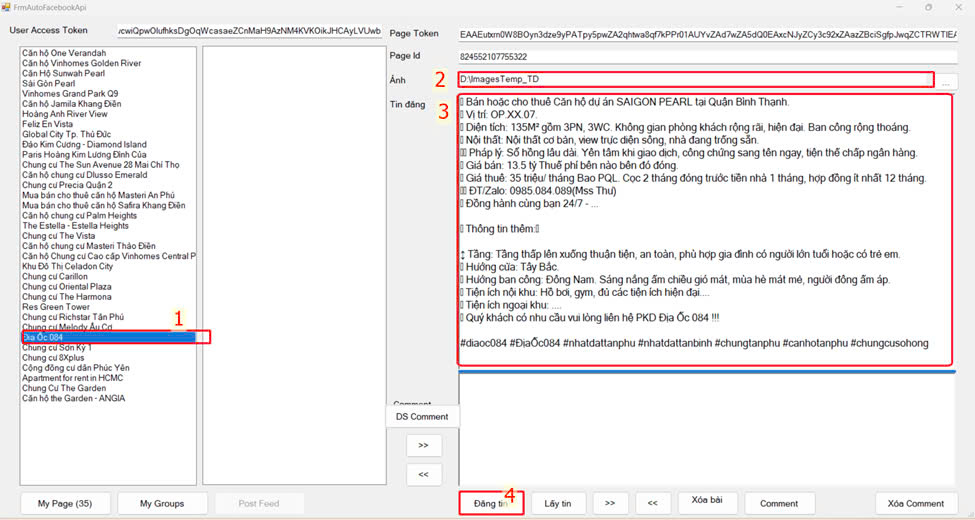
Step 1: Select the page where you want to publish the post.
Step 2: Choose the folder that contains the image(s) you want to include.
Step 3: Enter the content to be posted.
Step 4: Click the “Đăng tin” button to publish.
The result will be displayed as shown in the example below.
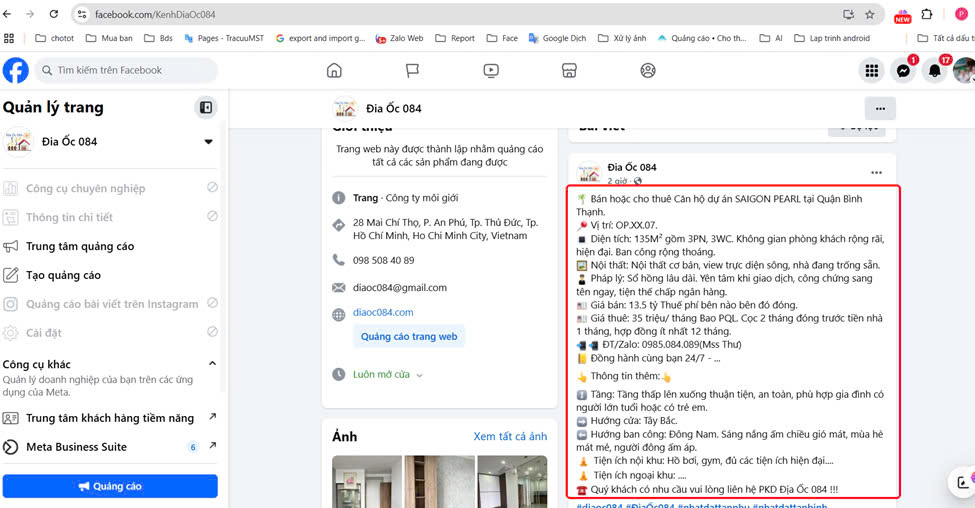
3.3 “Lấy tin” (Get post from page)
Step 1: Select the page you want to view posts from.
Step 2: The Page Access Token will be filled in automatically.
Step 3: The Page ID will be filled in automatically.
Step 4: Click the “Lấy tin” button.
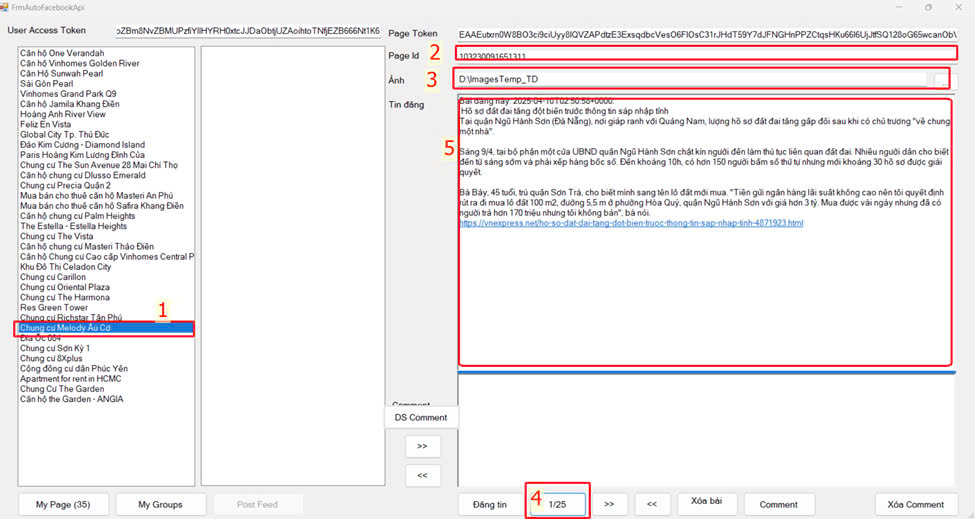
The result will be displayed in section (5). The first post from the selected page will be shown.
The label of the “Retrieve Posts” button will update to indicate which post is currently being viewed out of the total posts.
A maximum of 25 recent posts can be retrieved from the page.
Each post’s ID is stored to support further actions such as viewing comments, deleting the post, or posting a comment.
3.4 “>>” (View Next Post):
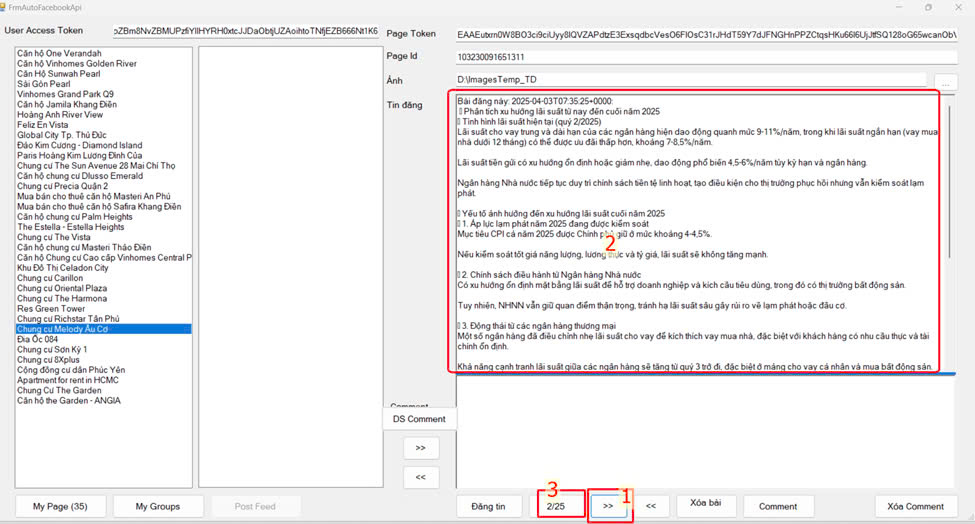
Step 1: Click the “>>” button.
Step 2: Text Box 2 will display the content of the second post on the page, including the posting date and time.
Step 3: The navigation indicator (e.g., button label or counter) will update from “3” to 2/25, showing the new post position in the list.
3.5 “<<” (View Previous Post):
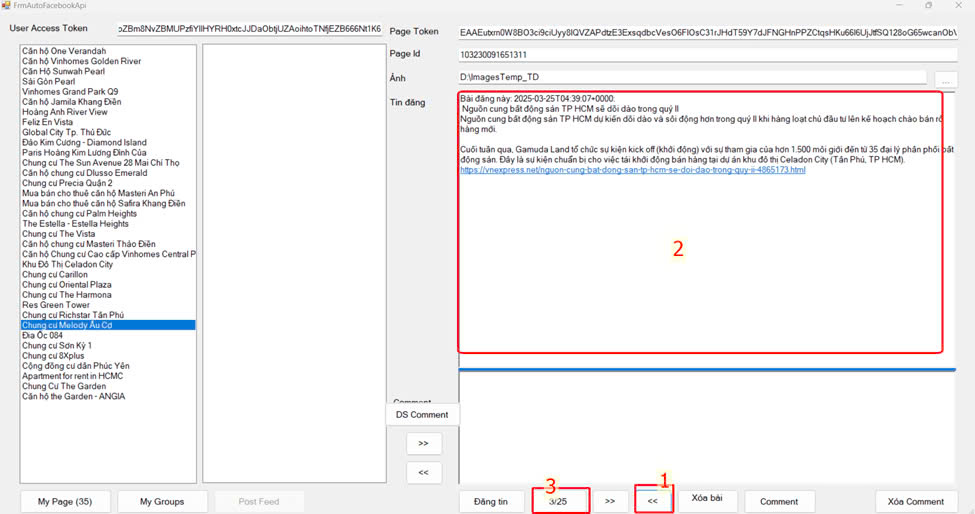
Step 1: Click the “<<” button.
Step 2: Text Box 2 will display the content of the previous post, including the posting date and time.
Step 3: The navigation indicator will update accordingly (e.g., from 2/25 to 1/25)
3.6 Delete a Post on the Page:
Steps to perform:
Step 1: Select the post using the “>>” or “<<” navigation buttons.
Step 2: Click the “Delete Post” button
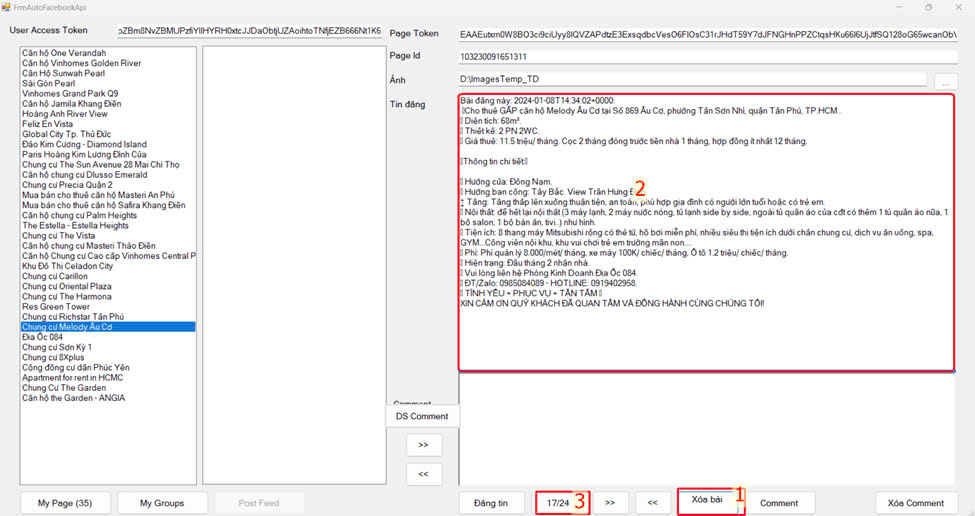
Result: After clicking the Delete Post button, Post #17 will be deleted. Post #18 will automatically shift into the #17 position and its content will be displayed in Text Box 2.
The total number of posts will update accordingly — from 17/25 to 17/24.
3.7 “Comment” Button:
When the Comment button is clicked, a tooltip menu will appear, allowing the user to choose from a variety of predefined comment templates to apply to the post.
The purpose of the comment is to notify page followers or top fans about updates.
When an item is selected from the comment list, the corresponding text of that item will be inserted as a comment on the post.
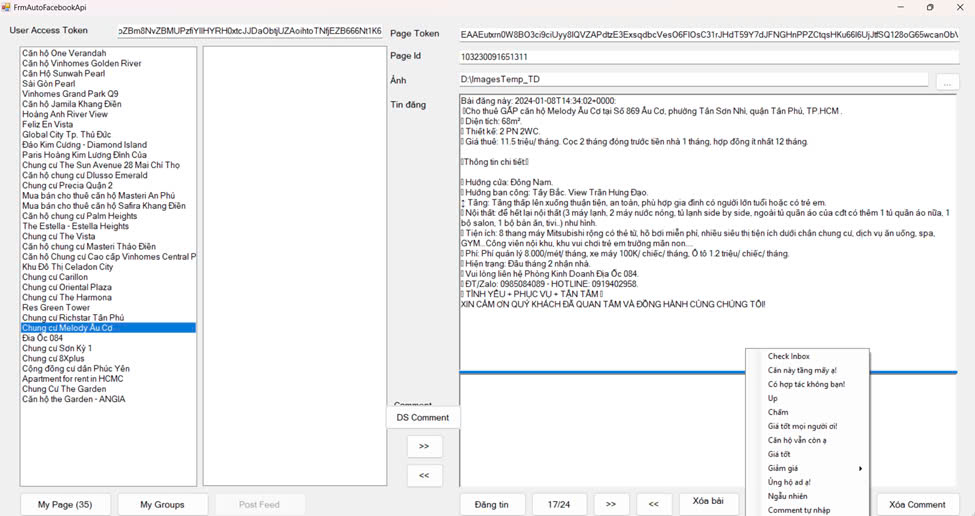
3.8 Select a Comment and View the Result:
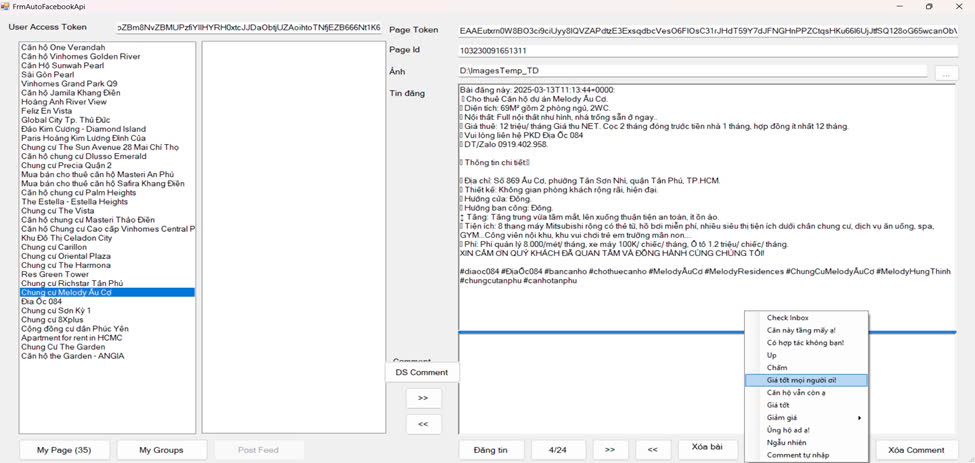
Step 1: Select Post #4.
Step 2: Click the Comment button to display the list of available comment options.
Step 3: Select the item “Great deal everyone!”
Result: The selected comment will be posted to the chosen post, as shown in the example below.
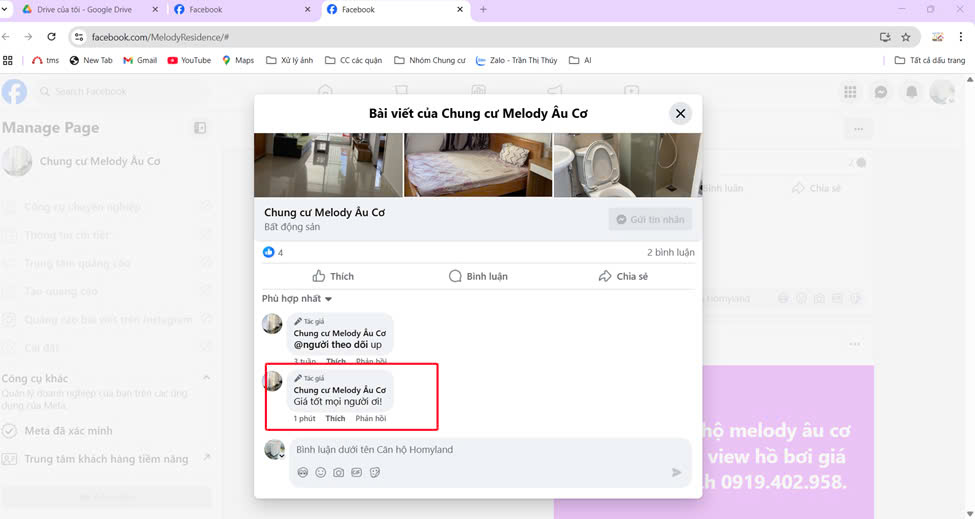
3.9 Comment List:
Step 1: Select the page and retrieve the list of posts.
Step 2: Click the Comment List button.
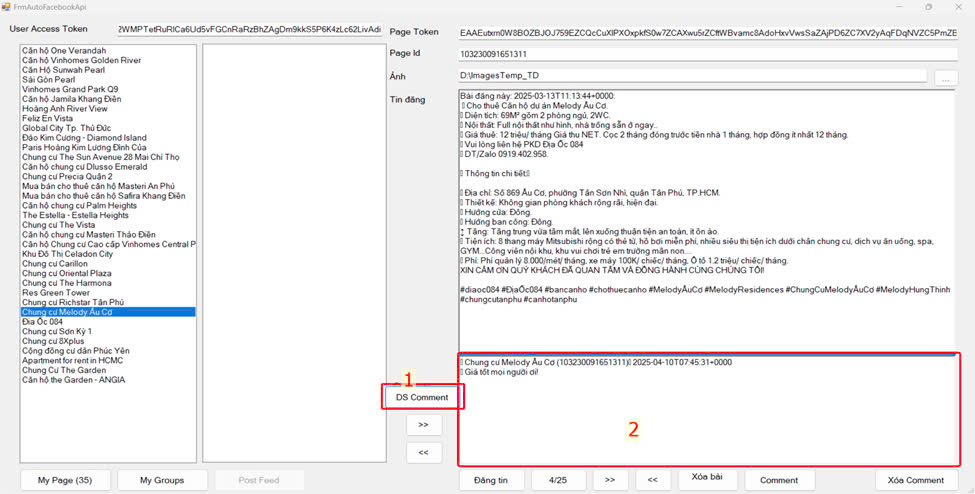
Result: Text Box 2 will display the first comment in the list of comments.
3.10 Delete Comment:
Steps to perform:
Step 1: Select the comment you want to delete.
Step 2: Click the Delete Comment button.
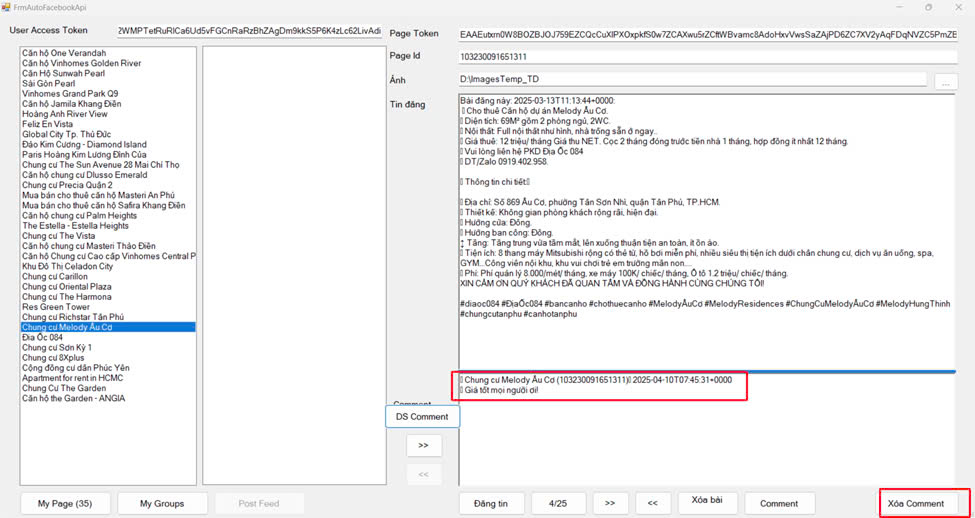
Result: The comment on the post from the fan page has been successfully deleted.
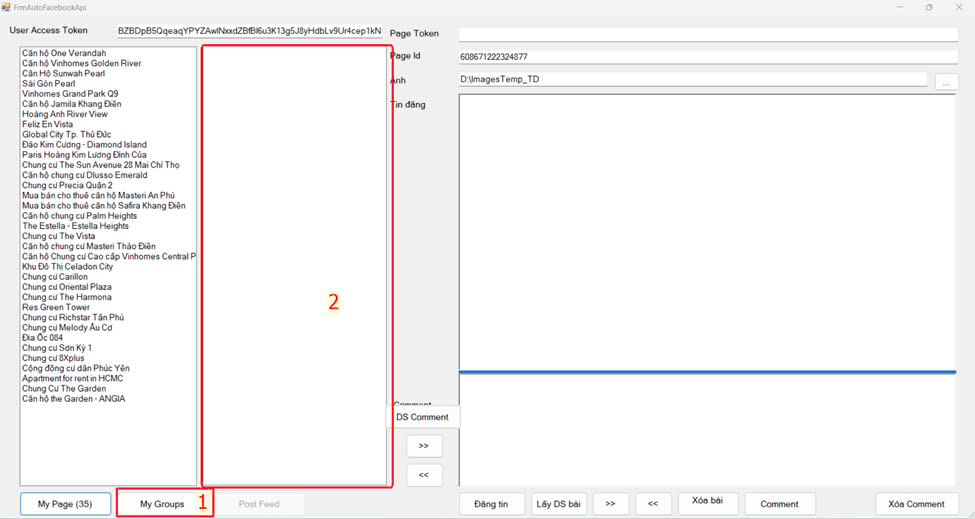
3.11 My Group Feature (Currently Inactive – Pending Facebook Permission)
Steps to perform:
- When no page is selected:
Click the “My Groups” button to list all groups the user either manages or is a member of.
Select a group to retrieve all posts the user has made in that group.
All features from section 3.1 onward will be available for group posts as well. - When a page is selected:
Click the “My Groups” button to list all groups that the page is a member of.
Select a group to retrieve posts associated with that page.
All features from section 3.1 onward will be available for posts in the selected group.
5. Permissions Requested for Review
- groups_access_member_info – Used to retrieve the list of Facebook groups that the user is a member of.
- publish_to_groups – Used to post content to Facebook groups on behalf of the user.
6. Justification for Requesting Special Permissions
publish_to_groups:
This permission is essential for users to conveniently and efficiently share content to Facebook groups.
The application does not perform any automatic posting without the user’s explicit confirmation.
Each post is manually created and approved by the user before being published to their selected group.
The app also allows users to schedule new posts, store post IDs, and later comment on those posts to notify group members about product status, or delete the posts when no longer needed.
groups_access_member_info:
This permission enables the app to list all groups that the user has joined.
It displays information such as group member counts and the number of new posts per day, helping the user analyze group activity and optimize posting strategy for better engagement.
7. Application Workflow
The user logs into Facebook.
The application retrieves the user’s access token.
The user selects the group they want to post to (from the list of accessible groups).
The user writes the content or selects it from the system.
The application sends the post to the group using the API endpoint: /{group-id}/feed
8. Commitment to Facebook’s Policy Compliance
We commit to the following:
- Not to use the API for spam, harassment, or any disruptive purposes.
- Not to store or retain any personal information from Facebook without proper authorization.
- To use only the permissions explicitly granted by the user.
- To strictly comply with Facebook’s Platform Policies and Community Standards.
🙏 Acknowledgment and Permission Request
Dear Facebook Developer Team,
First of all, I would like to sincerely thank you for providing such a powerful and flexible platform like the Facebook Graph API, which enables developers like myself to build meaningful and helpful solutions for users and communities.
My application is currently in its final development stage and undergoing internal testing. I respectfully request your support and approval for the permissions publish_to_groups and groups_access_member_info, which are essential for allowing users to fully utilize the functionality of posting to the groups they participate in — conveniently and in a controlled manner.
I affirm that the application strictly complies with Facebook’s platform policies. It does not collect or use user data without explicit consent, and it does not engage in any spam-related or abusive behavior.
You may download, install, and test the application to verify that all features are carefully controlled, require user confirmation, and do not negatively affect the Facebook user experience.
I sincerely hope to receive your positive feedback so I may continue developing and improving the application in the right direction and in full alignment with Facebook’s standards.
With respect and appreciation,
[PHẠM MINH LÃNH]
Developer – Địa Ốc 084